Hands-On AI Training
Most AI training is generic.Yours uses your own work.
You and your team learn to hand AI real work: replies, quotes, schedules, research, spreadsheets. We practice on your own tasks until reaching for it is a habit.
Example
Your AI fluency
Small gains add up
Here's the arithmetic for a five-person team. It's an example, not a promise.
5
people on the team
1 hr
saved per person per week
240 hrs
a year, over 48 working weeks
Why most AI training doesn't stick
Plenty of people tried AI once, got a strange answer, and wrote it off. Or they sat through a webinar, and then Monday came and nothing changed. Here's why.
Too generic
It shows how ChatGPT works, but nothing about your quotes, your customers, or your schedule.
Result: Nothing to use on Monday.
All theory
Slides and concepts, very little practice. What you don't do, you forget.
Result: Another hour gone.
No follow-up
Nobody checks in afterward, so old habits win.
Result: The subscription goes back to writing emails.
What we cover
One core curriculum, built around your business and the tools you already pay for.
Asking well
How to ask AI for what you want
AI is brilliant and knows nothing about your business. Give it what a new hire would need, and the answers get good fast.
Your tools
The AI you already pay for
ChatGPT, Claude, Gemini, or Copilot, whichever you have. Hands-on, not a tour.
Connections
AI connected to your apps
Let it read your calendar, draft in your inbox, and fill in your spreadsheets.
Workflow
Rebuilding one real job
Break one job from your week into steps, find the steps AI can take, and redo it start to finish.
Know-how
Getting it out of your head
Let AI interview you and turn the answers into checklists, price sheets, and FAQs. Handy for training new hires, too.
Practice
Your tasks, not examples
Every exercise uses your own work: your customers, your quotes, your wording.
Judgment
When to use it, and when not
How to check what comes back, what to keep for yourself, and how to spot hype.
Safe use
Customer data and simple rules
What's safe to paste in, which settings keep your data private, and a one-page AI policy for your team.
Habits
Making it stick
A short list of go-to uses for each person, and a check-in to see what's working.
Pick what fits your schedule
In person
One half day, or two shorter sessions
At your shop or office on the North Shore, with your whole team in the room.
Remote
Weekly sessions over 2–4 weeks
Same curriculum, paced so people practice between sessions. Good for teams in more than one place.
One-on-one
For the owner
Private sessions built around your own week. A good fit if you're the one who has to figure it out first.
Who's teaching
Global rollout of TakVisor, the AI platform I led, across 25+ Takeda sites in 5 regions. It cut document search from 45 minutes to under 5.
A $160M+ IT portfolio governed at Boston Medical Center, across 20+ teams and 150+ people. I was one of the leaders who implemented its PMIS, moving project, program, and portfolio management off an all-Excel start.
One of the first AI-integrated project management graduate courses in the country, which I designed and teach at Boston University.
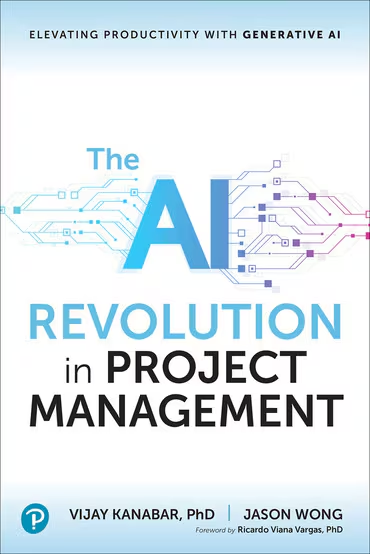
What my students say about my teaching
Anonymous comments from Boston University's course evaluation for AD 807, Summer 2026.
Prof. Wong created a welcoming and supportive learning environment where students felt comfortable asking questions and participating. He was knowledgeable, approachable, and responsive. The course was engaging and well organized, and I appreciated the balance between theory and practical real examples.
The most valuable aspects were the practical examples, structured explanations, and opportunities to apply the concepts. Prof. Wong's knowledge of the subject and ability to connect course material to real-world scenarios made the learning experience especially valuable.
Training is step one
Once you and your team know what AI can do, the next steps get easier to see.
1. Start here
AI Time-Back Assessment
I map how your business actually runs and hand you a ranked list of the jobs AI and better tools can take off your plate.
- About 1–2 weeks
- Fixed fee
2. Then
Done-for-You AI Setup
I set up the reminders, follow-ups, assistants, and connections inside the tools you already pay for, then hand them over working.
- Runs in your accounts
- Fixed price per job
3. Anytime
Hands-On AI Training
You and your team learn to hand AI real work, practicing on your own tasks, in person or remote.
- 1 to 25 people
- Taught by a BU adjunct professor
You're here
Not sure which fits? The free 30-minute call sorts it out. I'll tell you what I'd do in your shoes, even if the answer is "nothing yet."
Training questions
Do we need to have used AI before?
No. I meet people where they are. Beginners leave with a few go-to uses, and people who already use AI every day get pushed further.
What if people on my team are at very different levels?
That's normal. Exercises have a basic version and a stretch version, so nobody's bored and nobody's lost.
Which tools do you train on?
The ones you already pay for: ChatGPT, Claude, Gemini, Microsoft Copilot, Google Workspace, and the apps you run the business on.
How many people can you train?
From one owner to a team of about 25. Hands-on sessions work best with up to about 12 people in the room at a time.
Is it safe to put our business information into AI?
It can be, with the right settings and a few simple rules. That's part of the training, and you leave with a one-page policy your team can follow.
What if people don't use it afterward?
That's the problem this training is built to solve. Every exercise uses real work, and I check in afterward to see what's sticking.
What does it cost?
A fixed price in writing after the free 30-minute call, based on the format and the size of the group.
Schedule a free 30-minute consultation.Tell me the one job you're sick of doing.
- Format
- 30-minute call
- Price
- Free
- How
- Phone or video
What to expect
- A reply within one business day
- A fixed price in writing before any work
- No new software to learn
Prefer email? jason@jason-wong.com